
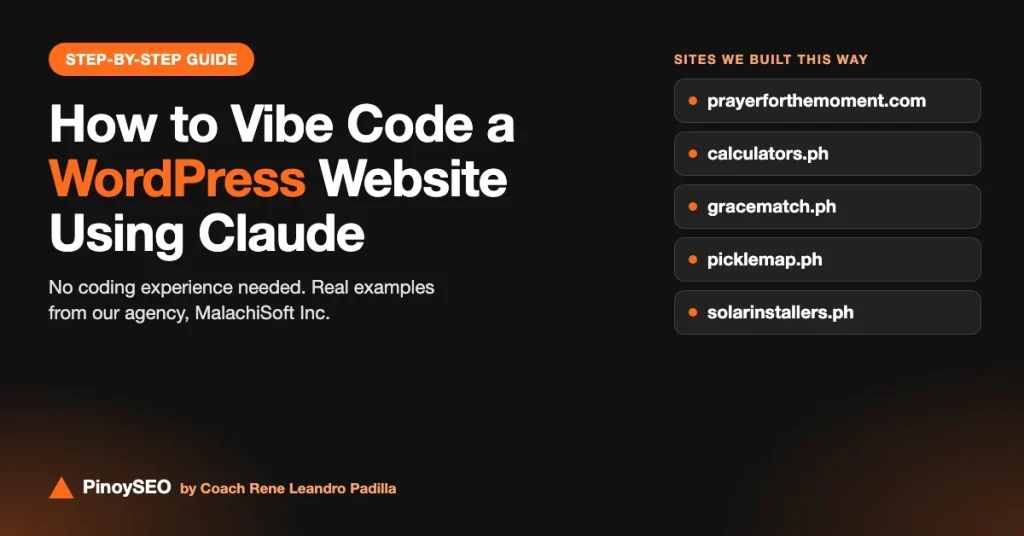
You no longer need to know how to code to build a real WordPress website. With Claude, an AI assistant made by Anthropic, you can describe what you want in plain English or Taglish, and Claude writes the content, design and code for you. This way of building is called vibe coding.
This isn’t just theory. At our agency, MalachiSoft Inc, we’ve used this approach to build several live WordPress sites, from a simple prayer site to a full pickleball court directory. In this guide, I’ll walk you through the process step by step and show you real examples of what you can build.
What is vibe coding?
Vibe coding means building software by describing what you want to an AI, instead of writing the code yourself. You explain the idea, the AI writes the code, you check the result, and you keep asking for changes until it looks and works the way you want.
For WordPress, this is a powerful combination. WordPress already handles the hard parts, such as pages, menus, users, blog posts and plugins. Claude fills in what used to need a developer: custom page designs, custom features and the code behind them.
Real examples: WordPress sites we built with Claude
All five of these sites run on WordPress and were built by our team at MalachiSoft Inc using Claude. They range from a simple content site to directories with their own custom features.
1. Prayer for the Moment
A site of short, Bible-based prayers for everyday needs like healing, anxiety, sleep, family, work and grief, plus a daily prayer email. It runs on a ready-made theme (Kadence), which is the simplest way to start: Claude helped plan the categories and pages and write the content, while the theme handles the design.
2. Calculators.ph
Free Philippine calculators for SSS, BIR income tax, Pag-IBIG, PhilHealth, take-home pay, 13th month pay, Meralco bills and more. It also uses the Kadence theme. This is a good example of vibe coding interactive tools: each calculator is a small piece of code that Claude can write from a plain description of the formula and the current rates.
3. GraceMatch PH
A faith-first Christian dating platform for marriage-minded Filipinos and Filipinas, with verified profiles. This is a much bigger build: it has its own custom WordPress theme and a custom plugin for member accounts. That shows how far you can go when Claude writes the theme and plugin code for you.
4. PickleMap.ph
A directory of pickleball courts across the Philippines, where players can search by city, compare rates and reviews, and court owners can list their courts for free. It runs on a custom theme and a custom directory plugin, both built with Claude.
5. SolarInstallers.ph
A directory where homeowners can find and compare solar panel installers by province and city, check their services and request free quotes. It runs on its own custom theme, with directory pages for each area.
What you need before you start
- A Claude Pro account (US$20 a month). The free plan has lower usage limits, so you can run out partway through a build. Paid plans also unlock tools like Claude in Chrome and Claude Code.
- A domain name, usually around US$10 a year.
- WordPress hosting. Most hosts can install WordPress for you in a few clicks.
- A clear idea of who your site is for and what it should do.
How to vibe code a WordPress website using Claude
Step 1: Plan your site with Claude
Start with a conversation, not code. Tell Claude what your site is about, who it’s for and what visitors should be able to do. Then ask it to suggest the pages, the menu, the main features and the keywords people would search for.
Example prompt: “I want to build a WordPress directory of pickleball courts in the Philippines. Players should be able to search by city and see rates. Court owners should be able to list their courts. Suggest the pages, features and site structure.”
Step 2: Set up your domain, hosting and WordPress
Buy your domain, point it to your hosting and install WordPress. If you get stuck on any setting, describe what you see to Claude, or paste the error message, and ask what to do next.
Step 3: Choose your starting point: a ready-made theme or a custom one
For a content site like Prayer for the Moment or Calculators.ph, a lightweight ready-made theme such as Kadence is enough, and it’s the easiest way to start. For a site with its own look and features, like GraceMatch, PickleMap or SolarInstallers, you can ask Claude to build a custom theme. Claude writes the theme files, you put them in a ZIP file, and you upload it under Appearance → Themes → Add New → Upload Theme.
Step 4: Build your pages and content
Ask Claude to write each page: your homepage, about page, service or category pages and contact page. You can ask for the text only, or for a full layout in HTML that you paste into a Custom HTML block in the WordPress editor. Review everything before publishing, and add your own experience and details so the content is accurate and sounds like you.
Step 5: Add custom features with a plugin Claude writes
This is where vibe coding gets exciting. When you need something no ready-made plugin does well, such as a calculator, a directory, a quote form or a member area, describe it to Claude and ask it to build a small WordPress plugin. Then upload it under Plugins → Add New → Upload Plugin and activate it. PickleMap’s directory and GraceMatch’s member accounts both run on custom plugins built this way.
Example prompt: “Create a WordPress plugin that adds an SSS contribution calculator using a shortcode. The user enters their monthly salary, and it shows the employee and employer share based on the 2026 contribution table.”
Step 6: Test, fix and improve
Open your site on a computer and a phone, and try every feature. When something breaks or looks wrong, tell Claude exactly what happened and paste any error message. Ask for one change at a time, so it’s easy to see what fixed the problem. This back-and-forth is the heart of vibe coding.
Step 7: Set up your SEO
A beautiful site won’t help if no one finds it. Ask Claude to write a title and meta description for each page, set clear headings, and suggest internal links between your pages. Install an SEO plugin, connect Google Search Console and submit your sitemap. All five of our example sites are connected to Google through Site Kit.
Which Claude tools can help
- Claude chat: for planning, writing content and generating page layouts, theme files and plugin code.
- Claude in Chrome: a browser extension (paid plans) that lets Claude work inside your browser, such as navigating your WordPress dashboard with you.
- Claude Code: for bigger builds like a full custom theme or plugin, where Claude creates and edits the files directly on your computer.
Tips to keep your vibe-coded site safe
- Back up your site before uploading any new theme or plugin.
- Test big changes on a staging site first if your host offers one.
- Never paste passwords or API keys into a chat.
- Ask Claude to explain the code it wrote and check it for security issues, especially for forms and member areas.
- Keep WordPress, your theme and your plugins updated, and use a security plugin.
Learn vibe coding with us, live
Want to build your own website this way, with a coach guiding you? Join our live course, Create Your Own Website by Vibe Coding Using Claude. It runs on two Saturdays, December 12 and 19, 2026, from 7:30 to 9:30 PM via Zoom. We’ll buy your domain together in class, your hosting is free for the first year, and both sessions are recorded.
🎄 Christmas promo: ₱999 until December 5 (regular ₱1,499), and ₱999 for all current and former PinoySEO students. See all our upcoming bootcamps.



Coach Leandro is an award-winning SEO specialist in the Philippines with over 16 years of professional experience as an SEO consultant. He has successfully managed clients from the US, Australia, UK, and Canada, delivering data-driven strategies that generate measurable results in search engine visibility and business growth.
In 2024, he was recognized as the “Outstanding Digital Freelancer of the Year” by the City Government of Iligan for his significant contributions to the freelancing and digital marketing industry.
He is the Founder and Owner of SOVA.ph, PinoySEO.ph, and MalachiSoft.com, where he continues to lead projects, mentor aspiring professionals, and provide SEO training programs tailored to the global market.
As a trusted SEO consultant and business owner in the Philippines, Coach Leandro is dedicated to helping businesses and individuals achieve long-term online success.
Beyond his professional achievements, Coach Leandro is also a passionate drone pilot, enjoying aerial photography and creative storytelling through drone videography.